
DocuWare indexing on its own, no operators.
Real-time bidirectional synchronization between DocuWare and your ERP, eCommerce or CRM. Delivery notes, invoices and contracts indexed automatically — no shared folders, no lost PDFs.
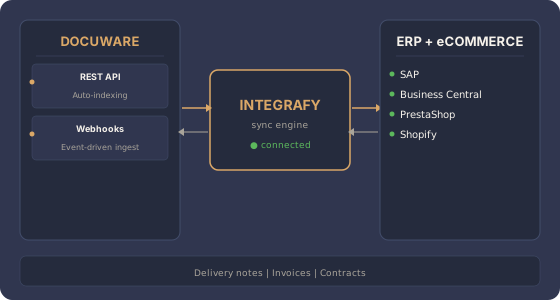
What does Integrafy sync between DocuWare and your stack?
Frequently asked questions about DocuWare + ERP
How does Integrafy connect with DocuWare?
Through the DocuWare Platform API (REST). Integrafy authenticates as an integration user and uses the upload and search endpoints with structured indexing. It supports both DocuWare Cloud and on-premise installations.
Which documents can be indexed automatically?
Any document generated by the ERP or the eCommerce: issued invoices, delivery notes, confirmed orders, PDF contracts, even relevant correspondence. Integrafy captures the binary document and its structured metadata.
What about OCR and intelligent capture?
DocuWare has its own OCR (Intelligent Indexing). Integrafy does not replace that OCR; it complements it: when the document comes from an internal system with known metadata, Integrafy applies it directly. When the document comes from outside (supplier, customer), DocuWare does the OCR and Integrafy propagates the result to the ERP.
Can flows be triggered in DocuWare from the ERP?
Yes. Integrafy can trigger the DocuWare Workflow Manager when uploading a document: approvals, reviews, electronic signatures. Traceability runs from the ERP to the document flow with a correlated ID.
What about access control and compliance?
Integrafy honors DocuWare permissions and roles. Each document is uploaded under the integration user's context with the appropriate ACLs. Retention policies, compliance tagging and audit logs that DocuWare already applies are preserved.
Want DocuWare indexing your business documents on its own?
Free 30-minute assessment.