
Mecalux connected to your ERP and your channel.
Bidirectional real-time synchronization between Mecalux Easy WMS, the ERP and the eCommerce. Locations, lots, picking and shipments aligned without touching the warehouse configuration.
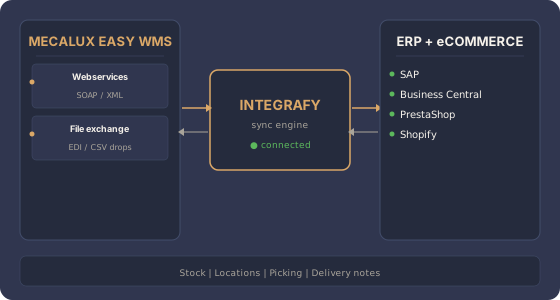
What does Integrafy synchronize between Mecalux, ERP and channel?
Frequently asked questions about Mecalux + ERP + eCommerce
How does Integrafy connect to Mecalux Easy WMS?
Through the SOAP webservices exposed by Easy WMS and/or structured XML file exchange over shared directories. The choice depends on the installed version and the agreements in place with Mecalux. Integrafy supports both modes.
Can you integrate with Easy WMS without touching the warehouse configuration?
Yes. Integrafy adapts to the existing Easy WMS setup: location types, stock owners, movement types, picking rules. We do not modify the WMS — we plug into how it already operates.
Is stock synchronized in real time?
Yes, with the granularity Easy WMS allows: completed movements, each location with its lots and expiry dates. Latency depends on the exchange mode (webservice push vs. file polling).
What about delivery notes and shipments?
The ERP issues the logical delivery note, Easy WMS executes picking and physical shipment. Integrafy synchronizes statuses and actual quantities shipped — if less is shipped, the delivery note is adjusted and the ERP receives the change with reason.
Does it support multiple Easy WMS warehouses?
Yes. Integrafy handles several Easy WMS instances as distinct warehouses inside the canonical model. Each channel (web, B2B, marketplaces) can query combined or warehouse-specific stock.
Do you run Mecalux Easy WMS and need to connect it?
Free 30-minute diagnostic.