
Dynamics 365 connected to your ERP.
Real-time two-way sync between Dynamics 365 and any ERP via Dataverse and OData. Native fit with Business Central. Sales, Service or Field Service — the data is the same.
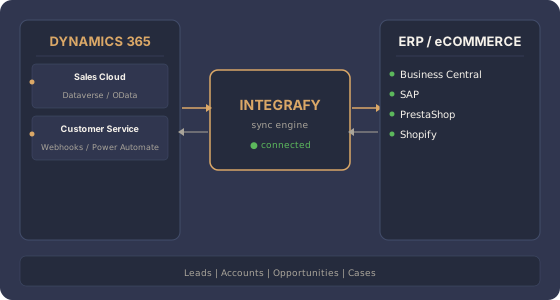
What does Integrafy sync between Dynamics 365 and your ERP?
Frequently asked questions about Dynamics 365 + ERP
How does Integrafy connect to Dynamics 365?
Through the Dataverse Web API (OData v4) with OAuth 2.0 authentication. Integrafy reads and writes standard and custom entities, supports batch requests, and uses change tracking to detect incremental changes without heavy polling.
Is it better to connect Dynamics 365 with Business Central via Dual-write?
Dual-write is Microsoft's native option when both run in the same tenant. Integrafy complements it in complex scenarios: Business Central on-premise + Dynamics 365 Online, multiple tenants, business rules Dual-write does not cover, or orchestration with other systems (eCommerce, WMS).
Which entities are synced?
Account, Contact, Opportunity, Product, Quote, SalesOrder, Invoice, Case. And any Power Platform custom entity. Integrafy auto-discovers the Dataverse schema and proposes the initial mapping.
Can Dynamics 365 Field Service or Customer Insights be integrated?
Yes. Field Service is a solution on top of Dataverse: work orders and resources sync the same way. Customer Insights consumes data from the Integrafy canonical model via standard Power Platform connectors.
Do we need Power Automate or Logic Apps?
No, but they complement each other well. Integrafy covers data integration and complex business logic. If you already have Power Automate flows, they can coexist — Integrafy exposes webhooks and endpoints that Power Automate can consume.
Got Dynamics 365 and an ERP not connected?
Free 30-minute diagnosis.