Saltar al contenido

Module 02 · Integrafy Platform · The catalog, governed

Data PIM

PIM software to centralize your catalog and publish it on every channel.

Integrafy Data centralizes products, variants, images and translations, measures the quality of every product sheet and publishes to your PrestaShop or Shopify store. With AI to translate, generate and categorize, and an MCP server for your assistants.
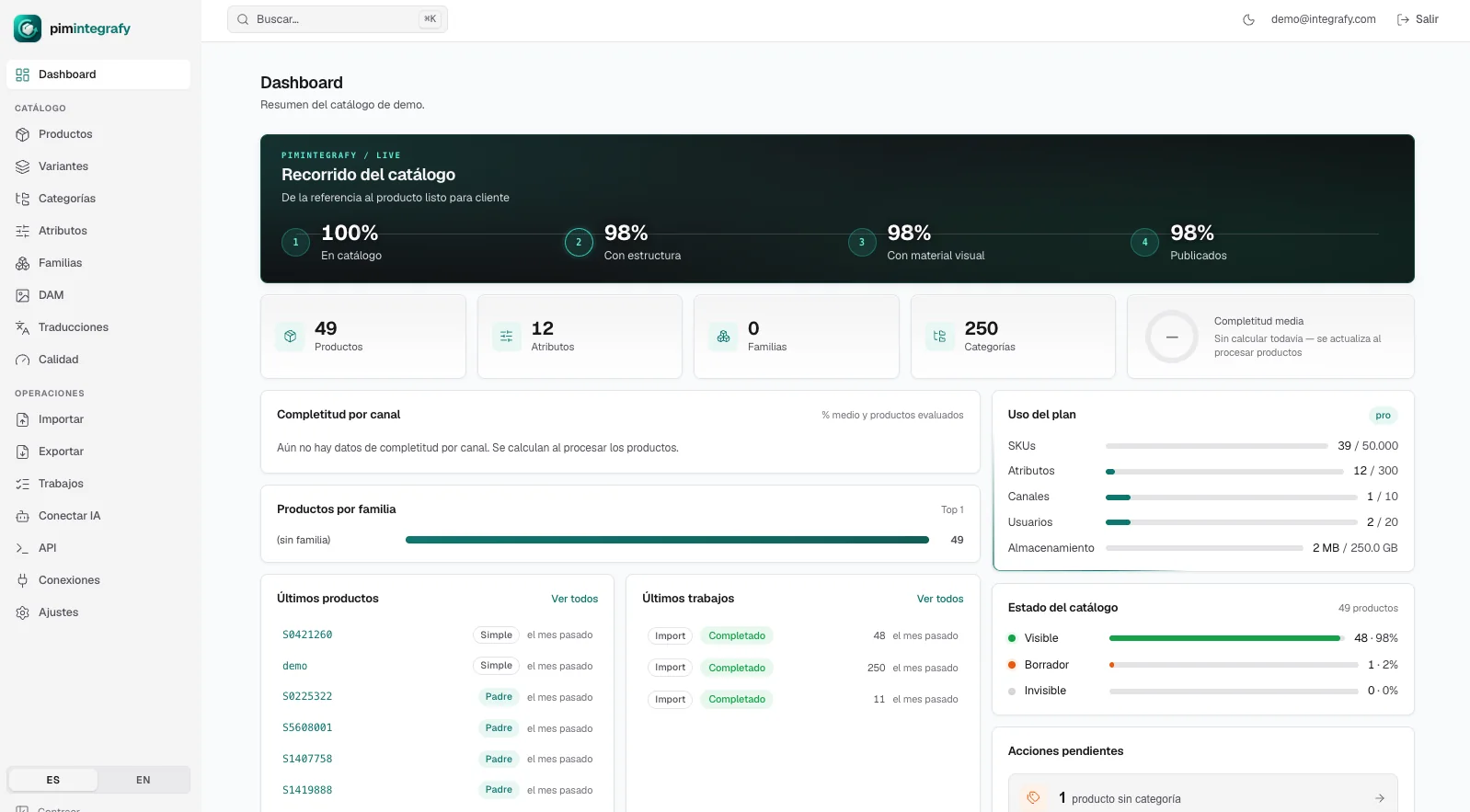
Integrafy Data dashboard with catalog journey, completeness and plan usage
Dashboard · completeness, plan usage and pending actions

The challenge

The catalog is the bottleneck. And it almost always lives in an Excel.

It is not a store challenge. It is a data challenge: the product sheet is born wrong and the error drags all the way to the customer.

Symptom 01

Three Excels, three truths

The real master lives on someone’s laptop. Nobody knows which is the latest version or who changed what.

Symptom 02

Half-finished sheets that publish anyway

Dimensions, EAN or photos are missing, but the product goes live. Then the customer asks by phone.

Symptom 03

Every language, by hand

Translating is copy and paste. And with every new product you start again from scratch.

Symptom 04

Importing with no way back

A bad mapping rewrites 4,000 sheets. Recovering them is a backup, a weekend and luck.

What really matters

A catalog is not maintained. It is governed.

The store, the marketplace, the sales PDF and the AI read the same sheet. If it is born right once, it arrives right everywhere. If it is born wrong, the error multiplies by every channel.

What Integrafy Data is

One single place where the catalog lives. The stores just receive it.

You import your data as it is today, structure it, measure what is missing and publish to PrestaShop or Shopify. No intermediate spreadsheets and no manual exports.

01

Built for real catalogs

Families, variant axes and attributes per channel and language. Works with or without families, as your catalog is today.

02

Reversible by design

Row-by-row validation before writing, field-by-field history and one-click rollback of the whole import.

03

Connected out of the box

PrestaShop and Shopify included in every plan, plus a public OAuth2 API and an MCP server for your assistants.

UnlimitedContent languages
IncludedPrestaShop · Shopify connectors
One clickImport rollback
OAuth2 · MCPPublic API and AI assistants

How the catalog flows

It comes in as it arrives. It goes out as each channel needs it.

Integrafy Data sits between the sources and the channels. Nothing is published without going through the model, the validation and the quality measurement.

In
ERPSKUs, prices and stock via Connect
Supplier filesCSV or XLSX as they arrive
ImagesZIP with SKU-based names
External translationExport and import per language

Integrafy Data

Single source of truth for the catalog
  • Families and attributes per channel and language
  • Row validation and rollback
  • DAM with renditions per channel
  • Translation and generation with AI
  • Quality and “ready to publish”
Out
StoresPrestaShop and Shopify, field by field
Scheduled filesFTP / SFTP in store format, CSV or JSON
API and webhooksREST with OAuth2 and signed webhooks
AI assistantsMCP server: query, audit and edit

Where it fits

Starts as a PIM. Grows as a platform.

Integrafy Data is the catalog layer of Integrafy Platform. It works on its own, on PrestaShop and Shopify. When the business calls for it, it connects to the other modules without migrating anything.

+ Connect

The ERP feeds the catalog

Prices, stock and SKUs come from the ERP. The catalog stops being maintained by hand.

+ Flow

Normalized suppliers

Each supplier file comes in, is transformed with rules and lands in Data already structured.

+ KnowOS and Agents

The catalog, readable by AI

Synced with the Data Lake: natural-language queries and alerts on stock, margins or returns.

Where Data sits in Integrafy Platform

01 · El dato que se mueve — Operación 02 · El dato que decide — Conocimiento ERP · eCommerceCRM · WMS Webs · PDF sincroniza ConnectERP · eCommerce · CRM Data · PIMCatálogo · atributos · DAM BDDato operativo ScrapingWebs y PDF de proveedor FlowReglas y automatización DocumentosFichas técnicas · manuales ConversaciónLenguaje natural · MCP BDData Lake KnowOSOntología · hipótesis AgentsAlertas · anomalías OBSERVE · trazabilidad, KPIs y alertas de todo el recorrido

Comparison

Excel and the store, or a governed catalog.

Almost every B2B catalog starts in spreadsheets. The challenge appears when SKUs, languages and channels grow.

Source of truth Excel + storeSeveral Excels and the store itself, each with its own version. Integrafy DataOne single catalog. The stores just receive it.
Quality Excel + storeDiscovered when a customer asks about what is missing. Integrafy DataCompleteness measured per channel and language before publishing.
Imports Excel + storeNo way back: a bad mapping rewrites thousands of sheets. Integrafy DataRow validation, field-by-field history and one-click rollback.
Languages Excel + storeCopy, paste and start again with every new product. Integrafy DataTranslation workbench and AI with your brand context.
Channels Excel + storeOne manual export per store or marketplace. Integrafy DataField-by-field publishing and scheduled exports via FTP or SFTP.
AI Excel + storeThe sheet is copied into a chat and the result pasted back. Integrafy DataMCP server with role-based credentials: query, audit and edit with review.
Traceability Excel + storeNobody knows who changed what or from which file. Integrafy DataRecord of who changed what, when and from which source.

Dashboard

The real state of the catalog, at a glance.

  • Catalog journey: from the loose SKU to the customer-ready product, in four measured steps.
  • Average completeness, visible products, drafts and invisible ones. No interpretation.
  • Real-time plan usage: SKUs, attributes, channels, users and storage.
  • Pending actions with a direct link to what needs fixing.
Integrafy Data dashboard
Dashboard · completeness · plan usage · pending actions

Catalog

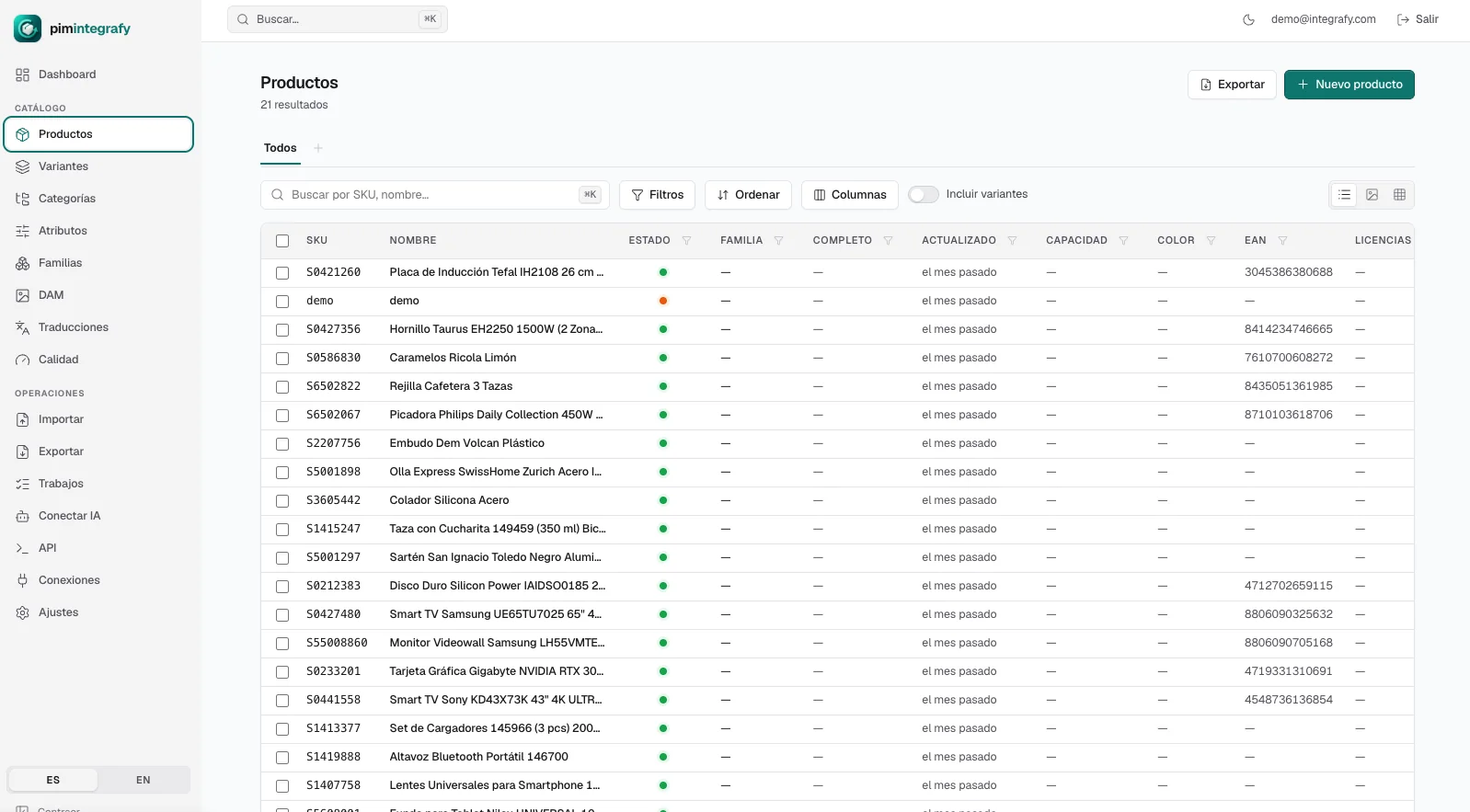
Products and variants as you really have them.

  • List with configurable columns, combinable filters and groupings, and saved views per team.
  • Per-channel editing: the store, the marketplace and the catalog PDF do not have to say the same thing.
  • Variant axes defined in the family or in the parent product itself.
  • Unique EAN and GTIN: the system does not let them repeat across products.
  • Bulk editing: select by filter, edit thousands of sheets and get the result per item.
Product list in Integrafy Data
Catalog · filters · sort · columns · saved views

Categories

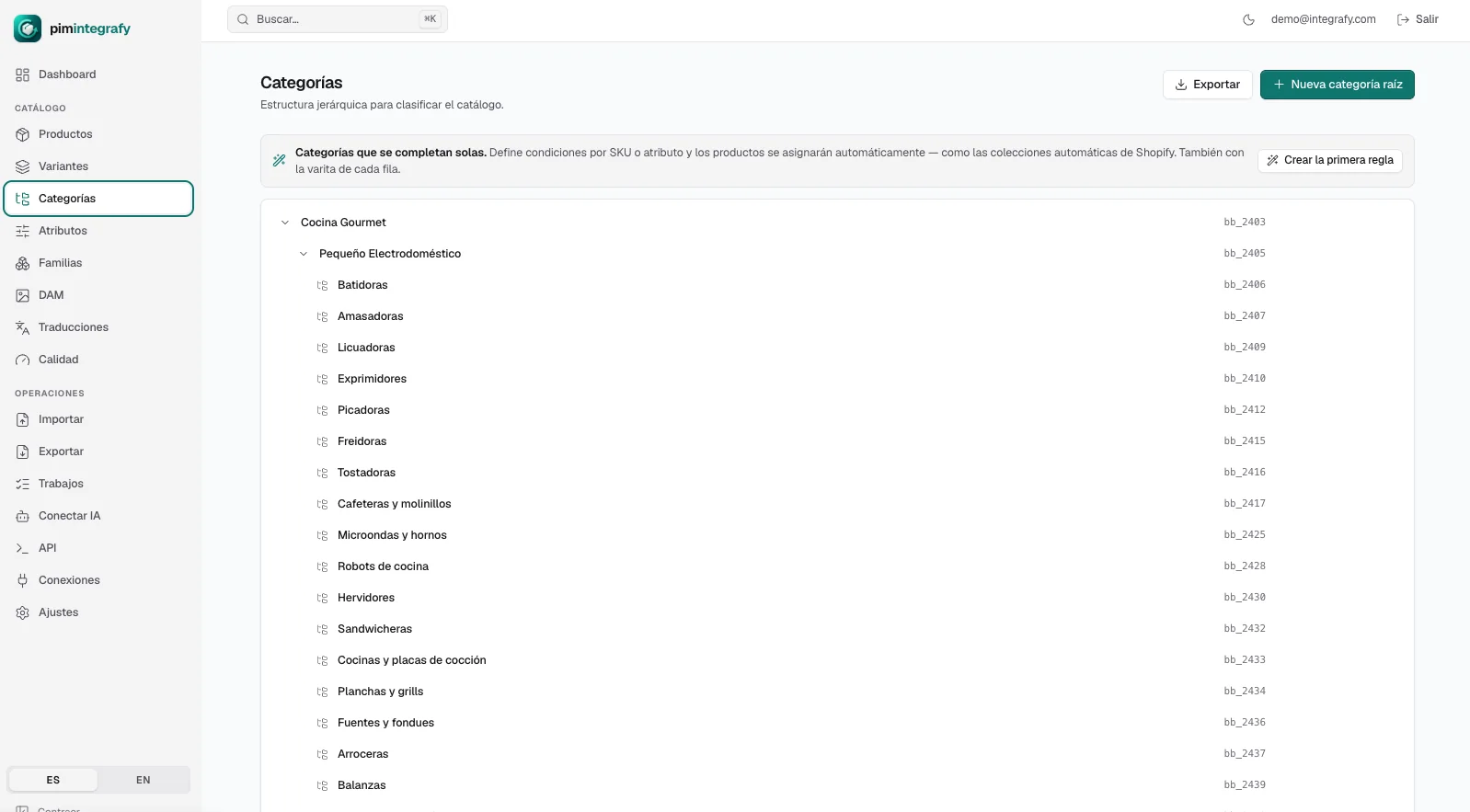
Categories that fill themselves.

  • Full hierarchical tree, with status per product: visible, draft or invisible.
  • Automatic rules: “if the SKU starts with…” or “if the attribute contains…”.
  • Rules always respect your manual assignments. They never override your judgment.
  • Category enrichment with its own content per channel and language.
Category tree in Integrafy Data
Categories · automatic rules · hierarchical tree

Data model

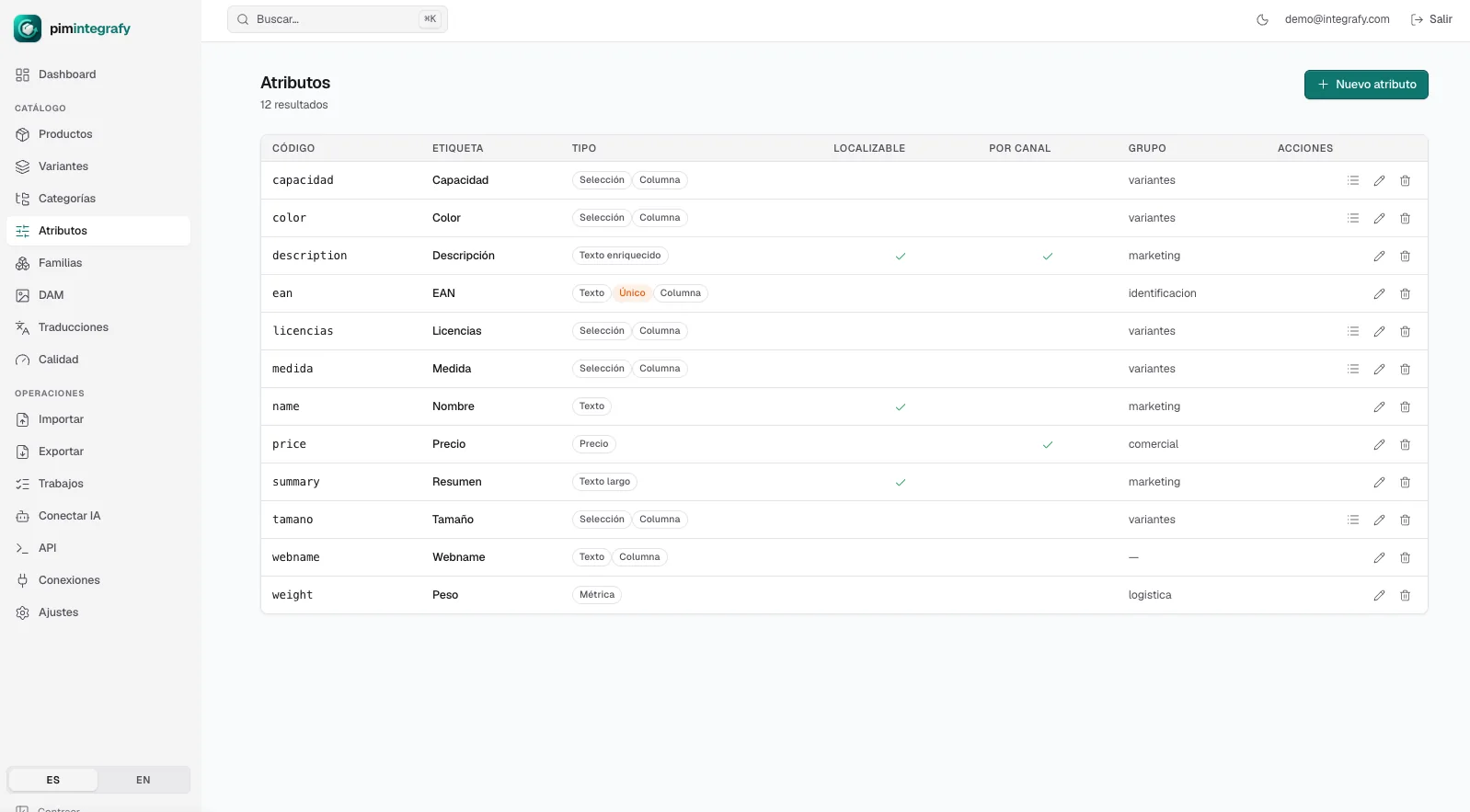
One value per language. One value per channel. Or both.

  • Real types: text, rich text, select, metric, price, multiselect.
  • Localizable and per-channel attributes, flagged one by one.
  • Families: every product type carries its mandatory attributes. Nobody duplicates an attribute or fills one that does not apply.
  • Formula-calculated fields: price with VAT, composite titles, derived measurements.
  • Unique identifiers and validations applied before writing anything.
Attributes in Integrafy Data
Attributes · localizable · per channel · calculated fields

Import

The only import you can undo entirely.

Upload your CSV or Excel as it is. The wizard guides you through the mapping, validates every row before writing anything and stores what is needed to revert it all.

01

You upload the file

CSV or XLSX, with your supplier’s columns. No preparation needed.

02

Assisted mapping

You see a sample of each column and decide which attribute it goes to. Saved as a profile.

03

Row-by-row validation

Downloadable report of warnings and errors, row by row, before touching the catalog.

04

Field-by-field history

Who changed what, when and from which source file.

05

One-click rollback

With a preview of what would be restored. The whole import, undone.

Profiles per supplier

Each supplier sends its file however it wants. Map once and the following months are automatic.

Images by ZIP

Upload a ZIP with names like SKU_1, SKU_2 and the images attach themselves to each product, in order.

Background jobs

Imports and exports with progress, cancellation and report. Nothing blocks your screen.

Images and documents
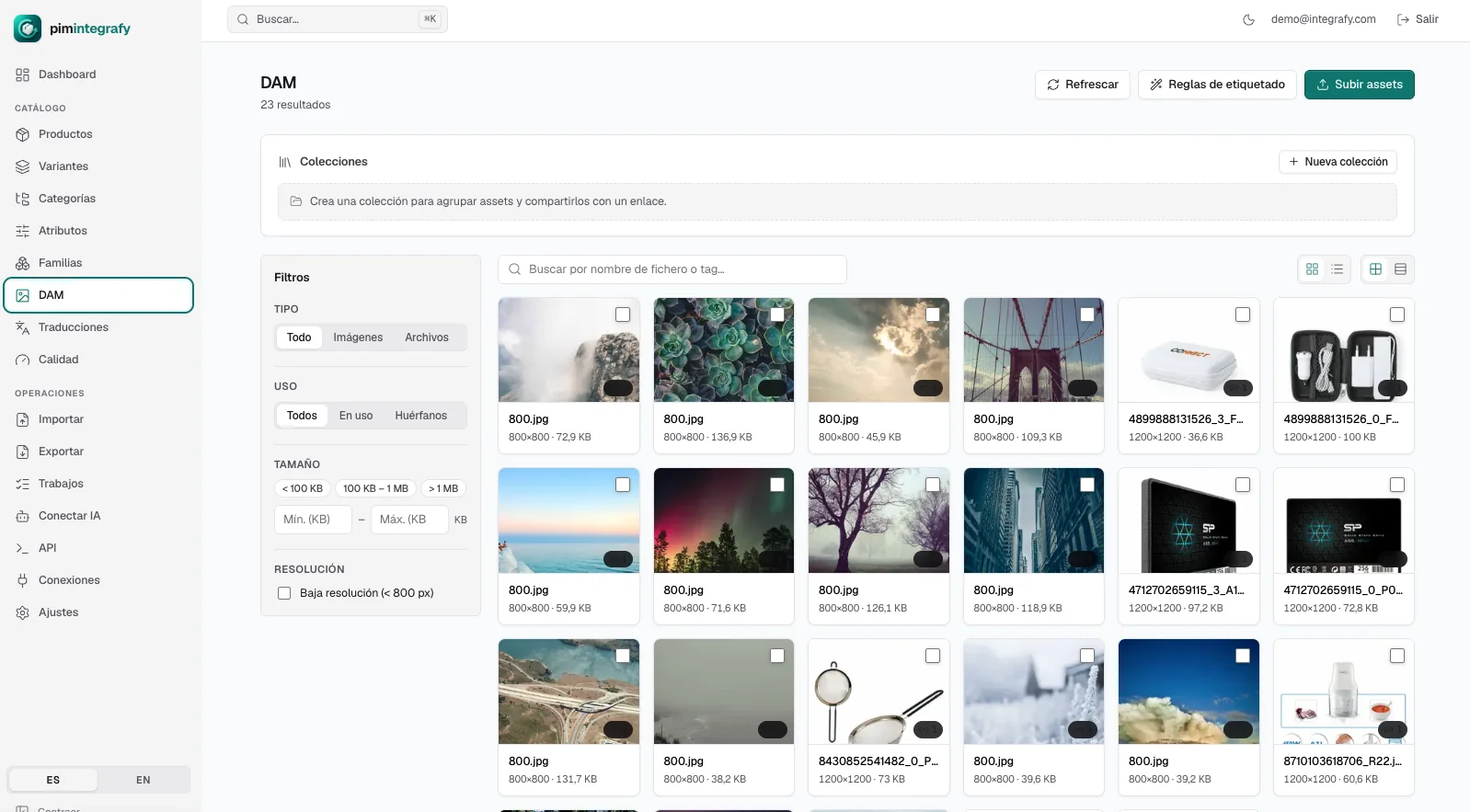
Your images, organized and ready for every channel.

  • Content-based deduplication: the same file uploaded twice takes up space once.
  • Automatic renditions and resolution templates per channel, with padding and centering.
  • Rules that tag files on their own when uploaded.
  • Collections sortable and shareable by link with expiry.
  • Filters by type, usage, size, resolution and tag. Including “orphans”.
Integrafy Data DAM
Media library · filters · collections · tagging

Translations with AI

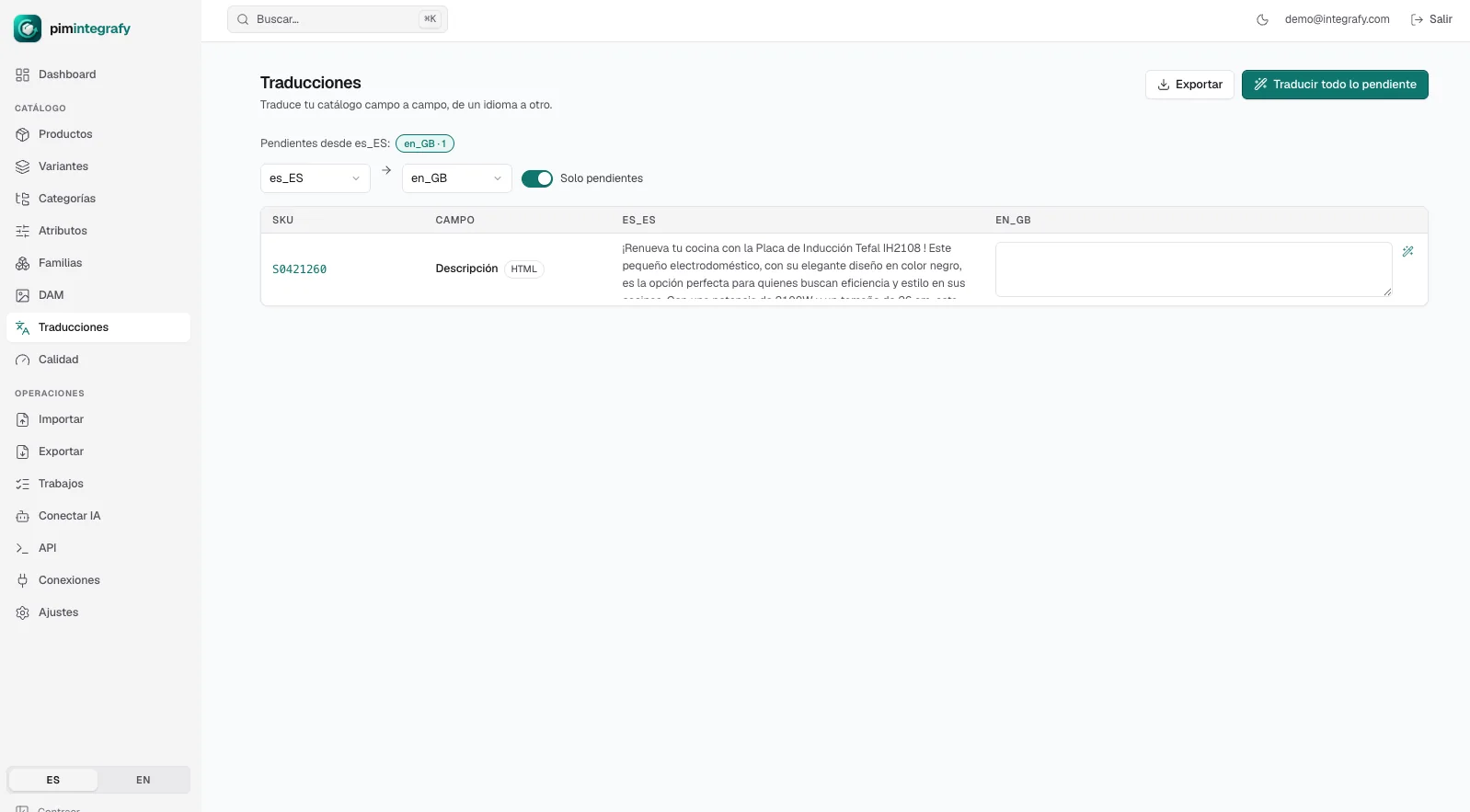
Translate as a flow, not as a patch.

  • Field-by-field workbench: you see the original and write next to it. Only what is pending.
  • Bulk translation of everything missing, with one button.
  • AI works with your brand context stored in the account, not with the isolated product. That is what prevents hallucinations.
  • Export what is pending per language, translate it outside and re-import without creating new products by mistake.
  • Unlimited content languages in every plan.
Translation workbench in Integrafy Data
Translations · pending per language · bulk translation

Quality

You know what is missing before publishing.

  • Completeness measured per channel and per language. Not a global figure that says nothing.
  • Required attributes per family, or a base for products that have none.
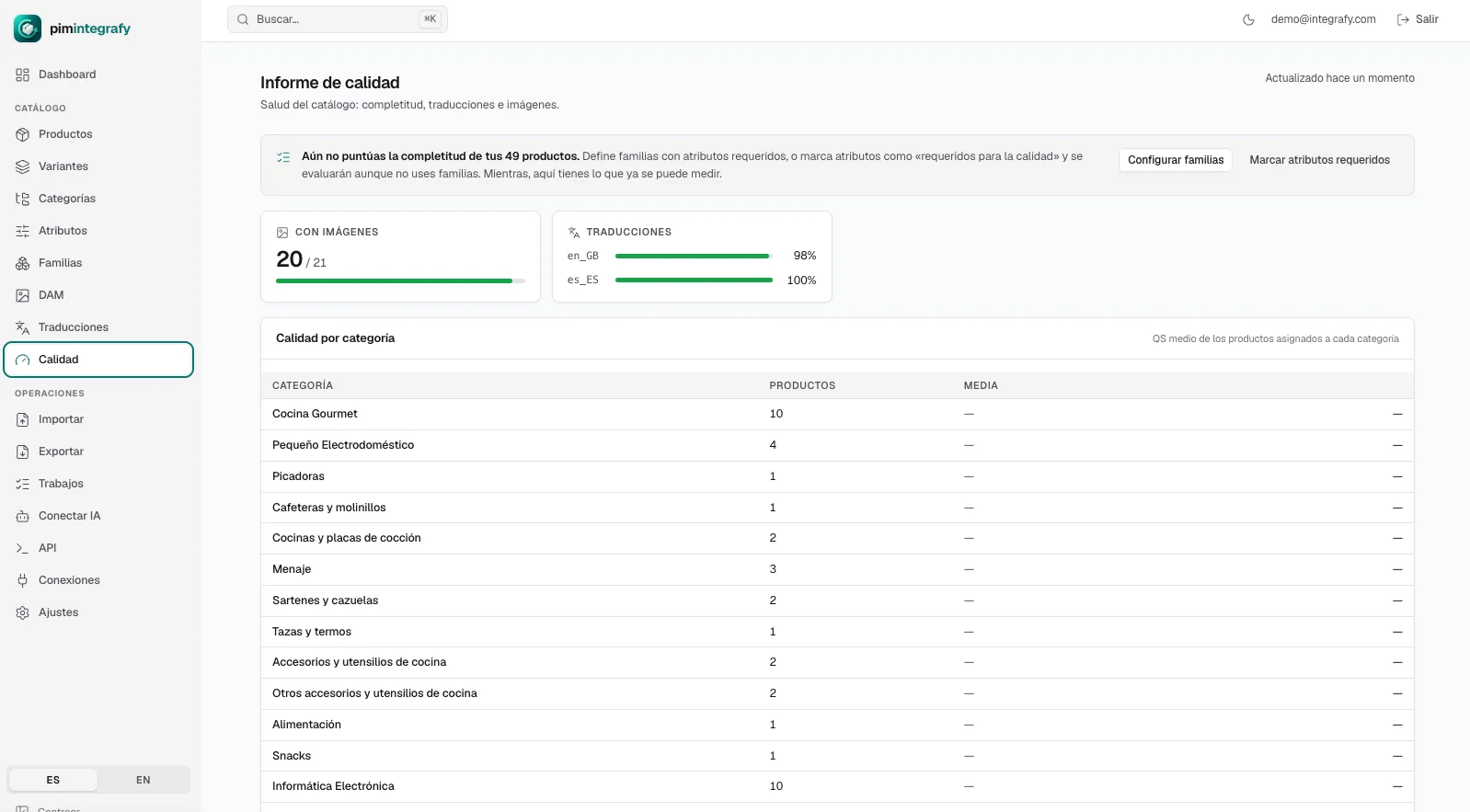
  • Translation and image coverage, with detail per category.
  • “Ready to publish” indicator and filters by quality level or missing attribute.
Quality report in Integrafy Data
Quality report · completeness · translations · images

AI and API

Your AI assistants, with access to the catalog.

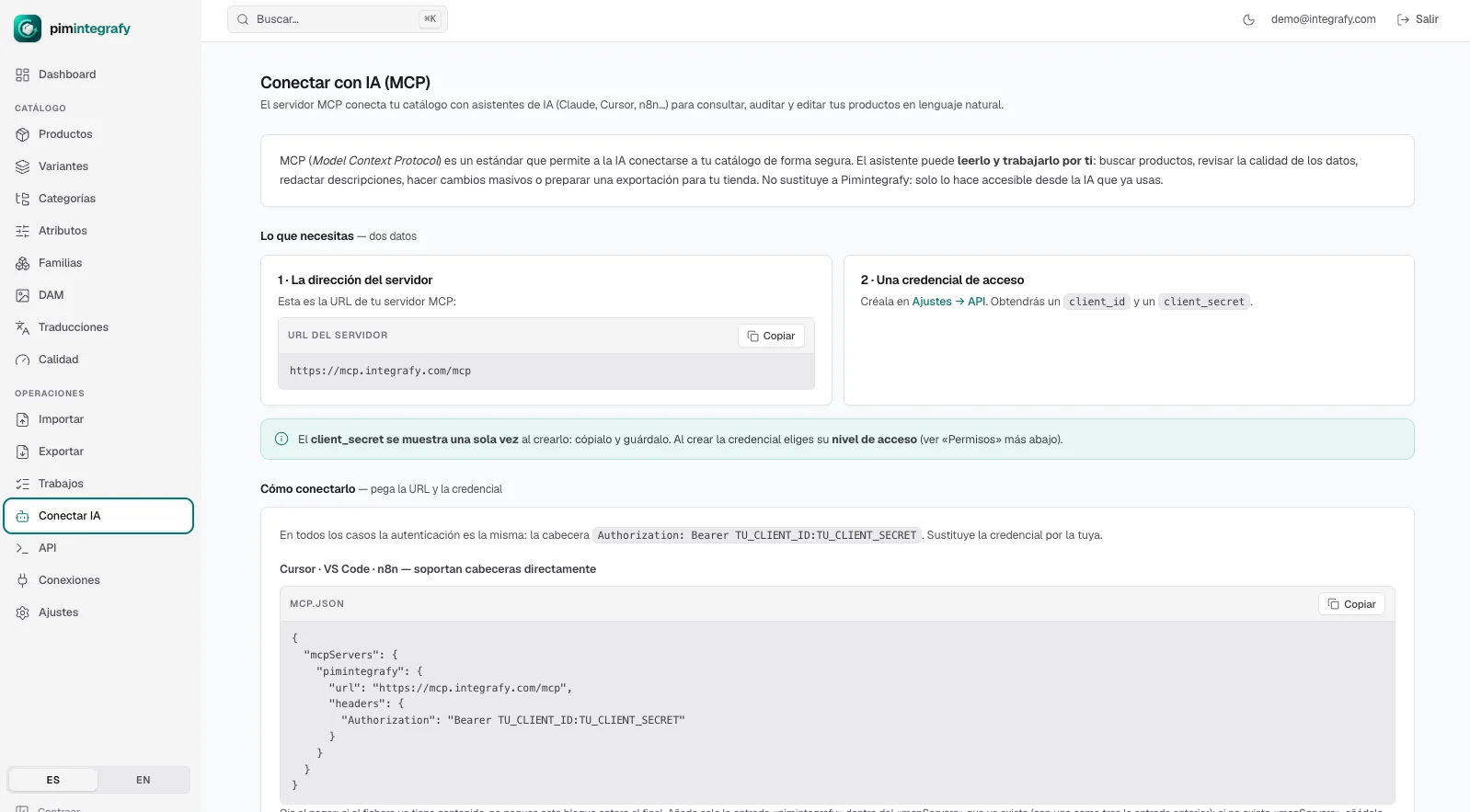
  • MCP server: connect the catalog to Claude, Cursor or n8n and work by chat.
  • “Give me the products above €300”, “change the price of this SKU”, “a price chart per family”. Query, audit and edit.
  • Role-based credential and permissions by access level: read, write or admin.
  • Public REST API with OAuth2, documentation and Swagger. HMAC-signed webhooks.
  • Nothing is written without your review.
Connect with AI (MCP) in Integrafy Data
Connect with AI · MCP · OAuth2 API

MCP server · role-based credential · illustrative example

The catalog, open to your AI. Each role, with its access level.

You connect the model your team already uses. The credential decides whether it can query, propose changes or administer. And everything stays in the history.

ClaudeChatGPTCursorn8n
MCP server · OAuth2 APIOne credential per role
Permissions by access levelRead · write · admin
Integrafy DataCatalog · attributes · languages · quality

Marketing

Read

“Which products in family A still need translating into German?”

List of pending SKUs, with their completeness per language.

Technical office

Write

“Update the weight of SKU A-4471 to 2.4 kg.”

Change proposed and recorded in the history. Nothing is written without review.

Quality agent

Read

Every Monday: sheets without image, without EAN or untranslated.

Automatic report to the catalog owner.

Integrations

Comes in where you already work. Goes out where you sell.

PrestaShopShopifyCSV · XLSXFTP · SFTPWebhooksOAuth2 APIMCP
Publishing

Field by field

You decide which attribute feeds each store field, with transformations. Variant axes sync as combinations.

Automation

Scheduled exports

Delivery via FTP or SFTP with its time zone and a connection test before saving. PrestaShop, Shopify, CSV or JSON format.

Control

Only what is ready goes out

Completeness and “ready to publish” are calculated per channel. Each product has its own status in each store.

Security

Roles, permissions and audit

Profiles per team, credentials per integration, MFA and a record of who changed what.

Performance

Instant search

Any SKU or value in milliseconds, with combinable filters. Shortcut from any screen.

No small print

Connectors included

The standard PrestaShop and Shopify connectors are in every plan. Not charged separately.

Plans

One price a month. No surprises.

Monthly plans. The standard PrestaShop and Shopify connectors are included in all of them. Prices exclude VAT.

Start

To leave Excel behind and tidy up the catalog of one store.

199 €/month
  • 5,000 SKUs · 5 users
  • 1 store · 3 channels · 25 GB
  • Catalog, variants and families
  • Import with rollback
  • DAM, quality and completeness
  • Public API and webhooks
  • No AI actions
Start with Start

Growth

Recommended

For eCommerce and manufacturers with several channels and a team.

449 €/month
  • 50,000 SKUs · 20 users
  • 3 stores · 10 channels · 250 GB
  • Everything in Start
  • AI: translate, generate, categorize
  • Bulk translation
  • FTP/SFTP exports and MCP server
  • About 200 AI actions a day
Choose Growth

Scale

For large catalogs, several markets and big teams.

899 €/month
  • 200,000 SKUs · 50 users
  • 10 stores · 25 channels · 500 GB
  • Everything in Growth
  • Guided technical onboarding
  • Usage and architecture review
  • Support with response target
  • About 1,000 AI actions a day
Choose Scale

Enterprise

Over 200,000 SKUs, several business units or dedicated infrastructure.

from 1,490 €/month
  • SKUs, users and stores to fit
  • Volume, retention and backups
  • Shared or dedicated infrastructure
  • Migration and integrations quoted
  • Guidance and agreed SLA
Talk to sales

A SKU is every simple product or sellable variant; the parent product that only groups variants does not count. At 80 % and 100 % of the limit we warn you: data is never deleted or hidden. Onboarding (modelling, mappings and integrations) is quoted separately by scope, in €520 work days.

See full pricing, packs and add-ons →

Frequently asked questions about Integrafy Data

What is a PIM and why do I need one?

A PIM (Product Information Management) centralizes all product information in one place. If you manage thousands of SKUs with technical attributes, several languages and several channels, a PIM removes the intermediate Excels, the errors and the manual update work.

Does it work with catalogs of over 200,000 SKUs?

Yes. The Scale plan covers up to 200,000 SKUs and Enterprise goes beyond. Integrafy Data processes imports and exports as background jobs, with progress, cancellation and report.

Can I undo an import?

Yes, entirely and in one click, with a preview of what would be restored. Also, every row is validated before writing and every change is kept in the field-by-field history.

Which connectors are included?

The standard PrestaShop and Shopify connectors are included in every plan. There are also scheduled exports via FTP/SFTP in store format, CSV or JSON, a REST API with OAuth2 and signed webhooks.

How does AI translation work?

From the Growth plan, AI translates, generates and categorizes using the brand context stored in the account. There is a field-by-field workbench, bulk translation of what is pending and export and import per language. Content languages are unlimited in every plan.

Can I connect Claude or ChatGPT to the catalog?

Yes. Integrafy Data exposes an MCP server with role-based credentials (read, write or admin). The assistant can query, audit and propose changes; nothing is written without review.

How much does Integrafy Data cost?

From €199/month (Start: 5,000 SKUs, 5 users) to €899/month (Scale: 200,000 SKUs, 50 users), with Enterprise from €1,490/month. No lock-in, VAT excluded. Onboarding is quoted in work days according to the modelling.

Technical session

A technical session to see if it fits.

Without changing anything you have today. We put your data model next to ours and tell you what it would solve as is, what would need modelling and what it does not cover.

Before

X-ray of your model

Which attributes, families, channels and languages you handle today, where they live and who maintains them.

The session

Contrast, field by field

We walk through your real catalog on Integrafy Data. What comes in as is, what needs work and what is left out.

After

Scope in writing

Volume, connectors needed, onboarding effort and plan. With or without us afterwards.

Request a technical session