
Tableau on top of a model that's already clean.
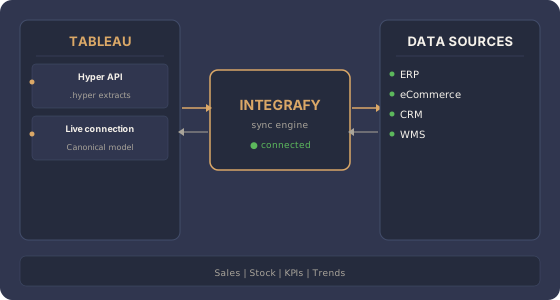
Tableau Desktop, Cloud or Server connected to the Integrafy canonical model. Hyper extracts or Live Connection with ERP, eCommerce, CRM and WMS data — ready to analyze with no manual preparation.
What data does Integrafy expose to Tableau?
Frequently asked questions about Tableau + Integrafy
How does Tableau connect with Integrafy?
Tableau can consume Integrafy data via a SQL Server-compatible driver (Live Connection), Hyper API with .hyper extracts or, in enterprise setups, through Tableau Server with published datasources. Integrafy exposes the canonical model as if it were an analytical database.
Extract or Live Connection?
Live Connection for real-time reporting; Extract (.hyper) for high-performance dashboards with periodic refresh. Integrafy supports both. For large volumes, Extracts with incremental refresh using canonical model change tracking.
Does it work with Tableau Cloud and Server?
Yes. Integrafy connects the same way with Tableau Desktop, Tableau Cloud (hosted) and Tableau Server (on-premise). The Integrafy gateway bridges private networks and Tableau Cloud when necessary.
Can Integrafy data be blended with other datasources in Tableau?
Yes. Integrafy acts as just another datasource: you can blend with spreadsheets, other databases or external APIs. The advantage is that Integrafy data already arrives clean and documented.
Does Tableau replace Integrafy Observe?
No. Observe covers operational visibility (sync monitor, errors, latency) for technical teams. Tableau covers business analytics for management and operations. Both consume the same canonical model but serve different audiences.
Want Tableau without hours wasted on data prep?
Free 30-minute assessment.