
Power BI on clean, up-to-date data.
DirectQuery over the Integrafy canonical model. ERP, eCommerce, CRM and WMS data always fresh, normalized and ready for reporting. No manual ETL, no SSIS, no stale datasets.
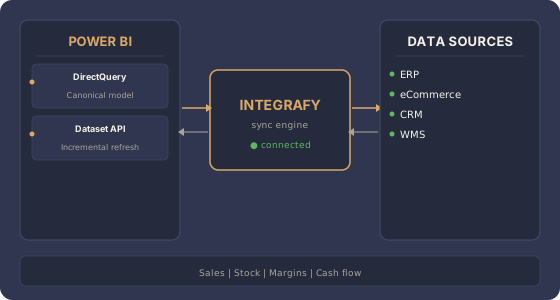
What data does Integrafy expose to Power BI?
Frequently asked questions about Power BI + Integrafy
Why connect Power BI with Integrafy instead of directly with the ERP?
Because the ERP holds dirty data: duplicate codings, outdated rate cards, entities fragmented across modules. Integrafy Data delivers a clean, documented canonical model. Power BI stops spending time on transformation and focuses on analysis.
Which connection mode is best: DirectQuery, Import or Dataflow?
It depends on the volume and freshness required. DirectQuery guarantees real-time data but demands properly sized infrastructure. Import is faster for periodic reporting. Integrafy supports both modes and also exposes managed Dataflows for complex consumers.
Does it work with Power BI Premium or Fabric?
Yes. Integrafy connects the same way with Power BI Pro, Premium and Microsoft Fabric. Canonical model datasets can be used as a lakehouse in Fabric if the customer chooses that architecture.
What security does the Power BI connection have?
TLS 1.2+ encrypted connection, OAuth 2.0 authentication or on-premises gateway, role-level filtering (RLS) mapped to the customer's org chart. Sensitive data (PII, billing) is filtered at the model level before reaching Power BI.
Does it work with historical reports or only real-time data?
Both. Integrafy keeps a full history of time-stamped events. Reports can consume current state, historical snapshots, time series or deltas as needed.
Want Power BI on data that doesn't lie?
Free 30-minute assessment.